Best free Taskbar Customization software for Windows 11/10
微软发布Windows 11操作系统 #生活知识# #科技生活# #科技新闻#
This post lists the best free Taskbar customization software for Windows 11/10. Using these software, you can set up your Windows taskbar and change its look and feel as per your preferences. These software provide you with more options than the default Windows taskbar settings to change its look and feel. You can add rounded corners to the taskbar, add a rainbow effect, make the taskbar transparent or opaque, customize taskbar items, and do much more.
How do I make my taskbar cool?
You can make your taskbar look attractive and nice using a free third-party taskbar customization app or software. There are several free apps, like RainbowTaskbar and NiceTaskbar, that let you apply different color themes to the taskbar, making it look more vibrant and better. You can also customize the transparency and style of your taskbar using these software.
Here are the best free Taskbar customization software that you can use to customize your Windows taskbar:
RainbowTaskbar ExplorerPatcher RoundedTB 7+ Taskbar Tweaker NiceTaskbar Windhawk. 1] RainbowTaskbar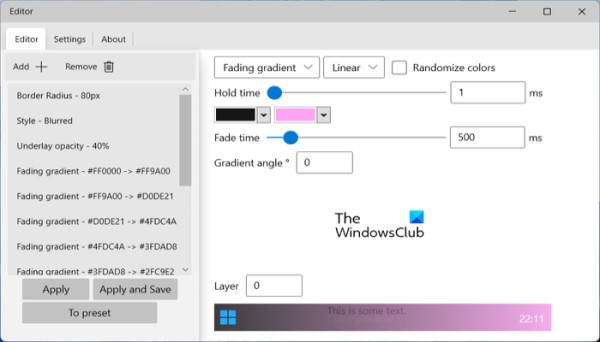
RainbowTaskbar is a nice free taskbar customization software for Windows 11/10. It is a useful third-party tool for adding a rainbow theme to your taskbar. When enabled, it keeps changing the taskbar’s color gradients based on your customizations.
Besides that, you can also customize the taskbar style as blurred, transparent, etc. You can also change taskbar opacity, underlay opacity, and layer opacity.
It has a dedicated Editor to set up the above and more taskbar options. You can customize the color gradients that you want to apply to your taskbar. In addition, it lets you set preferences such as solid, fading solid, fading gradient, gradient, random color, hold time, fade time, gradient angle, and number of layers. It also lets you select colors to change gradients.
All in all, it is one of the coolest software to add colors to your taskbar and make it look funky, pleasant, etc. You can download it from Github.com.
Read: Enable or disable Taskbar Thumbnail Preview in Windows.
2] ExplorerPatcher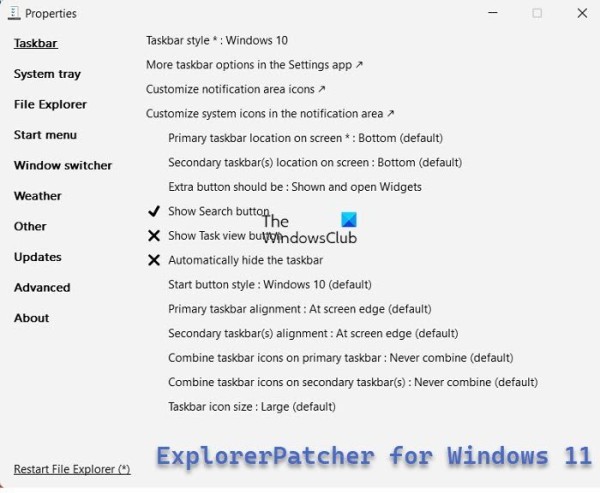
ExplorerPatcher is another nice software to customize the taskbar on Windows 11. It basically enables you to roll back your current taskbar to Windows 10’s taskbar. Not just the taskbar, it even lets you customize File Explorer, Start Menu, Weather, and more. So, if you want to get the Windows 10 look and feel back to Windows 11, this software is for you.
You can customize taskbar settings like taskbar position, show search button, system icons, taskbar alignment, taskbar icon size, and more. Besides that, you can even customize the clock, battery, sound, and other taskbar items as per your preferences.
Read:
How to customize Windows 11 Taskbar How to customize Windows 10 taskbar 3] RoundedTB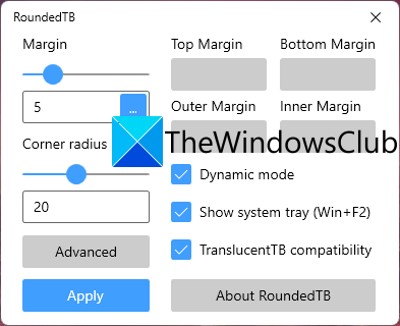
RoundedTB is a free Microsoft Store app to customize your taskbar. Using it, you can add rounded corners, margins, and segments to your taskbar in Windows 11/10. Furthermore, you can adjust the rounded-corner radius and customize the margins. Besides that, it lets you enable or disable other options, such as Dynamic mode, Show system tray, and TranslucentTB compatibility.
See: How to show Multiple Clocks on Taskbar in Windows?
4] 7+ Taskbar Tweaker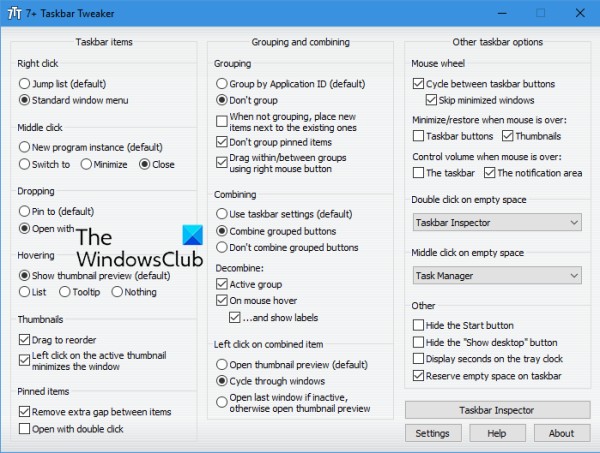
7+ Taskbar Tweaker is a taskbar customization software for Windows 10. The new Windows 11 taskbar is unsupported by this software. Hence, you can use this software to customize the taskbar only in Windows 10 and earlier versions of Windows. However, you can install Windhawk mods to use this software on Windows 11.
It lets you change settings such as the right-click menu, middle-click action, thumbnails, mouse hover, pinned items, grouping, combining, decombining, and more. More taskbar control options that it offers include showing or hiding the Start button, displaying seconds on the tray clock, reserving empty space on the taskbar, etc. It has a Taskbar Inspector tool that lets you group, combine, or label taskbar items.
You can get it from here.
Read: Best Free Microsoft Store Apps to Customize Windows 11
5] NiceTaskbar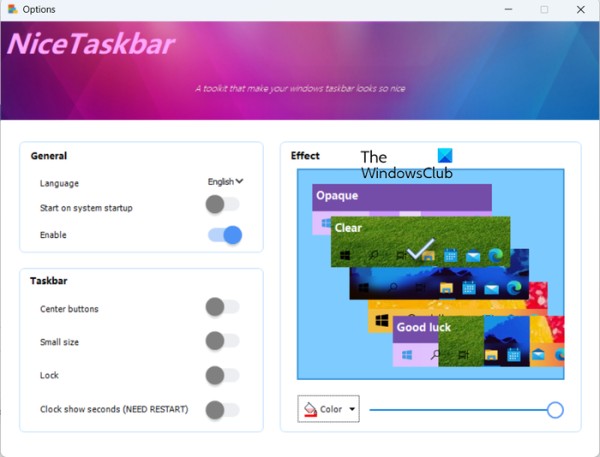
NiceTaskbar is yet another free taskbar customization app for Windows 11. It provides some basic options to customize your taskbar. You can enable or disable options such as center buttons, small size, lock, and showing seconds on the clock. Besides that, you can select the background color of your taskbar and set the taskbar effect to opaque, clear, blurred, fluent, etc.
You can install it from Microsoft Store.
6] Windhawk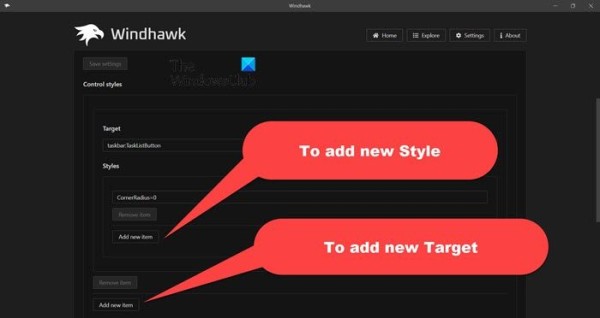
Windhawk lets you lets you customize the Windows Taskbar, Start menu and more! It adds new design elements to Windows.
I hope this helps!
This video is unavailable.
Read: Taskbar has disappeared from the Desktop in Windows.
Can I get TaskbarX for free?
TaskbarX is a Microsoft Store app that is paid. To download and install it, you will need to make the required payment and then you will be able to use the app. However, a free version of this app is available on Github.com and taskbarx.org that you can download and use on your PC.
Now read: Taskbar icons not showing, missing, invisible, blank in Windows.
网址:Best free Taskbar Customization software for Windows 11/10 https://c.klqsh.com/news/view/348871
相关内容
How to Change the Taskbar Color on Windows 11How to Change Taskbar Colour in Windows 11: A Step
How to Change Taskbar Color in Windows 10: Step
How to Change Color of Taskbar in Windows 11: A Step
10 Best Remote Training Software for Enterprises (2024 Update)
How to Set Up Multiple Monitors Windows 11: A Step
Getting started with Krita: A free digital painting tool for beginners and pros
How to set up Dual Monitors on Windows 11/10
Get Help With File Explorer in Windows 11 & 10 (Ultimate Guide)
How to Get Help with File Explorer in Windows 11/10
随便看看
最新乐趣
- 看得出来小四四们舞蹈基础不错 TF家族四代|陈思罕|抽象
- 这段撞车戏,看得人揪心!
- 老酒馆那正红被日本人割辫子那正红替人平事挨打被骂老鳖茄子
- 一位优秀的演员,可塑性可以有多强?
- 开酒瓶时不小心击中天花板吊灯
- 谷爱凌亮相VOGUE盛会 白色Dior高定礼服讲述背后故事
- 总裁带美女回家,兄弟两眼放光,立马就要加微信
- 来了来了,小侯带着Monkey走来了
- 突然来上这么一段,被你们臭给给吓死
- Jennifer Hudson秀互动 五人选宅家三人欢呼出游
热点乐趣
- 89809
- 78155
- 64292
- 60386
- 39856
- 35916
- 32652
- 23041
- 22803
- 21621